Urban Dune II

Last year I did my first Urban Dune post that featured this same image, though a different crop from it. That image was processed in Picasa to the best of my abilities and by then I was exceeding its capacity regularly, to the point I could not save my edits without Picasa throwing a fit and changing everything.
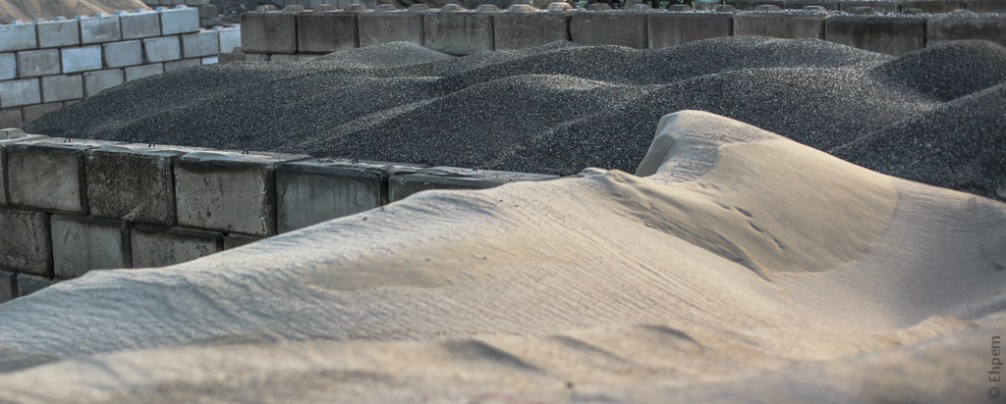
Today I revisit that photograph, with a new crop as a continuation of my experiments with Topaz Clarity that I began in yesterday‘s post. The image above is processed with Clarity, on top of the Lightroom 4 edits which are showing in the image below.
I think the differences speak for themselves; Clarity obviously has its uses and can be a very powerful tool in some instances.
.
Canon EOS 5Dii, Canon 50mm/f1.4 lens, ISO100, f2.2, 1/800th.
.


 burnt embers
I’m wondering how close to Topaz Detail the Clarity module is. I can certainly see the improvements with Clarity – it’s sharper but also has enhanced contrast.
LikeLike
Hi Andy – I am sorry I can’t help you with comparisons between Detail and Clarity. Maybe one of my readers uses both and will pitch in.
LikeLike
The Clarity difference is obviously much better than the “non-Clarity” version. And I like the crop, too. Too many folks underestimate the value of the perfect crop.
LikeLike
Thank you Ken. I tried a number of crops for this shot. I only had my 50mm lens with me, and was shooting over the fence, so not much I could do about framing in camera.
LikeLike
I am really enjoying Clarity, and you image above is a beautiful reason why.
Fantastic textures and tones here.
Beautifully done!
LikeLike
Thanks Lisa! I am enjoying it too, though I have not had a lot of chance to play yet. It sure worked well on these dunes, brought out what I had failed to realise with other software.
LikeLike
I wonder if unsharp mask in Photoshop wouldnt work much like Clarity.
LikeLike
Hi Val. Not being a user of Photoshop I am not sure. However, for Lightroom there is much more control over this process, with multiple tools for sharpening in different areas of darkness and so on, and apparently all the same controls within masks (which I have not figured out how to do yet).
LikeLike