Time Lapse Storm Drain
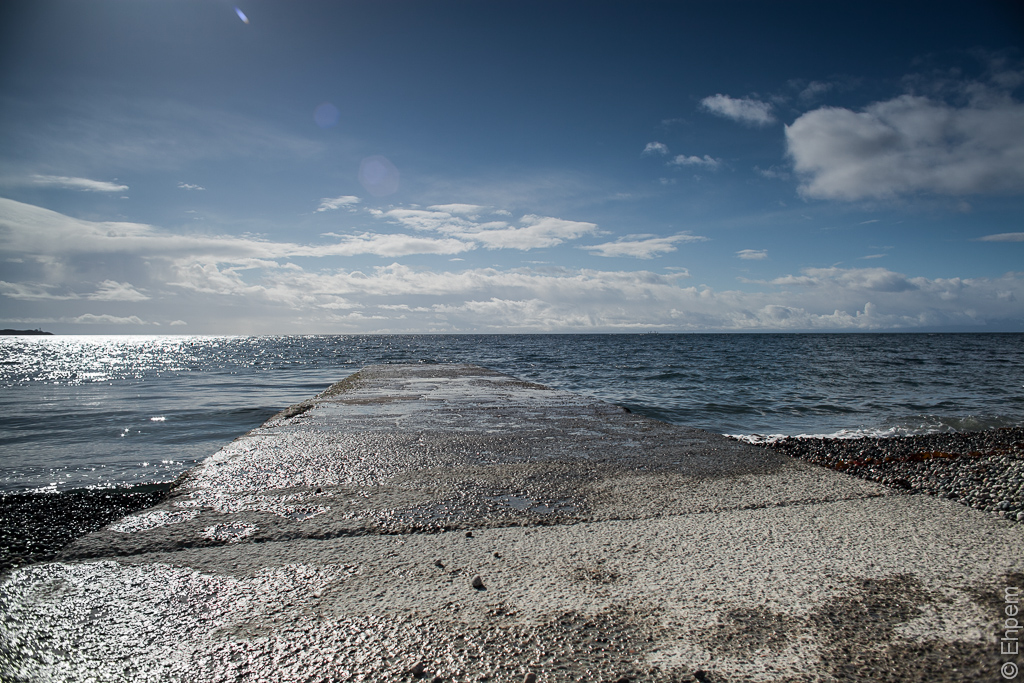
With Graduated ND Filter
Another attempt at timelapse photography, this one trying to implement lessons learned from earlier experiments. In this case, the main effort was to try to get lots done in camera to reduce computer processing time as much as possible. I made a number of camera settings for sharpness, contrast, saturation and similar. More important was the use of a graduated neutral density filter (ND8), in this case rotated to the left to tone down the brightest area of the sky and water and avoid the need for masking or graduated filters in Lightroom. I shot the images at a lower resolution (3861 x 2574 pixels). I cleaned the sensor (as best I could) and shot with a lower depth of field so that sensor dust does not show so clearly. I levelled the camera with a bubble level and kept my hands off the camera. Soon I got a bit bored, lovely as it was to be on the beach on a day like this, so I took to tossing a single beach pebble onto the drain between each frame.
To view the video click on the image below.
.
I would recommend that you enlarge to full screen size, and set the resolution to the highest setting, if your connection can handle it.
The picture below was taken without any filters, the top one with the graduated ND filter, just to show the difference that the filter made. My best intentions were somewhat foiled by Lightroom 4 which strips all the camera settings when importing RAW files, so I had to do a small amount of global adjustment including white balance, clarity, sharpening, and contrast adjustments. Even so, I found that the time to process each image during rendering was 12 seconds or so, a huge improvement over the 5 minutes I had imposed on the process for my Timelapse Sunrise experiment and thus I could render this video in 35 minutes, instead of 20 hours.
I find the pebbles distracting – there is a lot going on in the sky so I don’t really want you looking at the strange sprinkle of pebbles during the video. Notice for instance the clouds going in two directions at once. However, throwing a pebble every 10 seconds made the dog owners keep their dogs well away – only one walked in front of the camera during the 41 minutes I was shooting this and most others wall called to heel or leash as they approached. Useful in that respect. Also, no one walked out on the drain, which might have been OK if they were really slow about it, but otherwise would have been a distracting flicker at this shooting rate.

Without filters
.
.
Canon EOS 5Dmkii, Nikkor-N 24mm/f2.8 lens, ISO100, f-5.6, 1/640th second for all images. 232 stills shot at 10 seconds apart (between 9:03 and 9:44am) with the aid of a Pixel TW-282 timer. RAW files edited in Lightroom 4, the rendered as a movie through LR4 Slideshow module, with a user template downloaded from a youtube instructional video which works very well. I chose the 24fps option.
.
.


 burnt embers
How cool, I have always wanted to try timelapse, bravo for doing it! I’ll admit that the first time I watched it the pebbles distracted me from the awesome cloud action! Watched it a second time just to watch the clouds…hehehee.
Thanks for posting, looking forward to more!
LikeLike
Hi David, thanks for all your comments today – it’s awesome to have a swack of them all at once:)
Timelapse really takes a lot of time to get everything ready for posting, but it sure is fun. My main concern with it (other than storage space on the computer, recently remedied with another 4TB of drive space) is the number of actuations on my shutter. They rack up awfully fast.
The pebble trick is a sneaky way of boosting views!
LikeLike
I find the time lapse really interesting. Like those stones have a life of their own jumping in and out of the frame. Very cool!
LikeLike
Thanks Karen. I am enjoying the time lapse photography, even though very time-consuming. Today’s post is another one!
LikeLike
Once again, I agree with Ken – this IS your best one so far.
I watched it three times (so far) – once to see the clouds, once to see what the water was doing, and the third time to check out all those pebbles!
LikeLike
Oh, that’s why I have 5 views on youtube – one from Richard, one from Ken and 3 from you. Thanks!
LikeLike
Do you want me to keep watching? I can use my laptop and my phone, too, to really drive those views up.
LikeLike
I seem to be up to 10 views now, which is pretty good for one of my videos:)
LikeLike
You’ve gone viral!!
LikeLike
I don’t mind the pebbles being tossed at all. This is your best effort so far and it’s apparent that you have gained a lot of information from doing this a few times. The ND filter makes a big difference (for the better), at least on this particular day. You may not need it at all at certain times of the day.
LikeLike
Ken – thanks for the encouragement:)
I got a kit with 3 graduated filters in it, equivalent to 1, 2 and 3 EV. I use the 3 EV on this one. I can see the other two being useful as well (and the holder can stack them for really extreme situations).
It also occurs to me that it might be possible to withdraw them very gradually for changing conditions during a long sequence. I think that could be done without any flicker, etc. Or, with sufficient foresight, they could be set up in the holder ready to be incrementally slid further in to decrease light.
LikeLike
amazing how the pebbles get chucked around as if by an invisible juggler!
LikeLike
If you watch closely you will see one occasionally moves, or disappears. I kept on hitting them with new pebbles, which it was impossible to aim as they bounced in any old direction on that rough surface.
LikeLike